An alarm for iPhone
Get up. Walk over. Scan to stop.
Scamper locks your apps when the alarm rings and keeps them locked until you scan a small NFC tag that lives somewhere away from your bed. By the time you reach it, you're up.
Coming soon to the App Store
Tell me when it launchesFree to download. For iPhone with iOS 26.

How it works
Three steps, one walk.
No puzzles, no math at 6 a.m. Just a short walk to a sticker.
Set your alarm
Pick a time and a tone, as usual. Stick your tag in the kitchen, the bathroom or anywhere you have to walk to, and pair it once.
Your phone locks
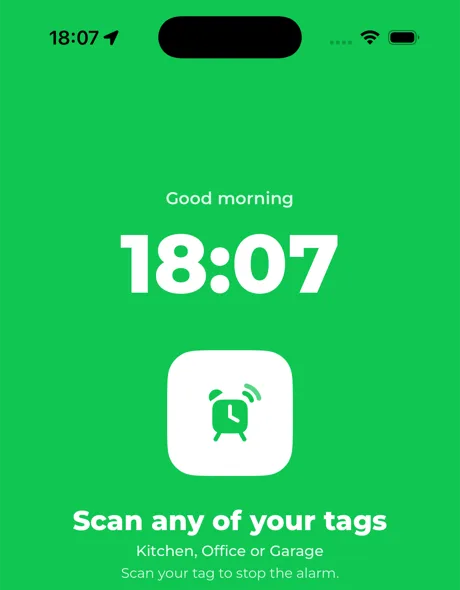
When the alarm rings, Scamper locks your apps through Apple's Screen Time, apart from the ones you choose to keep, like Phone. Stop just rings again.
Scan your tag
Walk to the tag and hold your iPhone near it. The alarm stops and your apps unlock. You're already out of bed.
No tag to hand?
Walk it off instead.
Away for the weekend, or the tag's gone missing? You're never stuck.
Walk it off
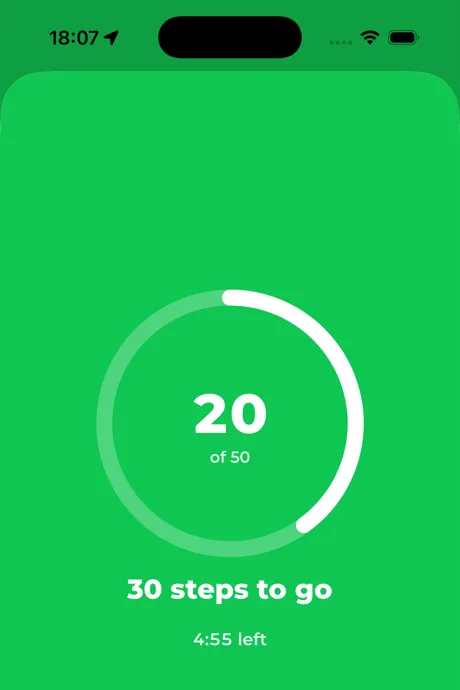
Hold No tag? on the ringing screen, then walk the set number of steps before the timer runs out (50 steps in 5 minutes by default). Your iPhone counts them; the alarm keeps ringing until you're done.
Emergency unlock
Hold the emergency button for 60 seconds and everything stops and unlocks. It's there for real emergencies, so it costs you your streak.
Already up?
Stop works normally when it should.
Scamper only makes you walk when you're actually in bed. If it can tell you're up or out, Stop works like any other alarm.
Already walking
If your iPhone counted 150 steps or more (by default) between two hours and five minutes before the alarm, you're clearly up.
Strict when you want it
Mark an alarm as Strict and it always needs your tag, even if you're already up or away from home.
Away from home
Your tag is at home, so when you're somewhere else, Stop works. Set a Strict alarm if you want the tag every time.
Streaks and stats
Watch the mornings add up.
Scamper keeps score on your iPhone, not on a server.
Streak
Days in a row you got up, by scanning or walking it off. Days without an alarm don't count against you.
Up in
How long it took you to get from alarm to tag, averaged over the last 7 days.
This week
How many of this week's alarms you beat.
Features
Small app, one job.
Everything in Scamper exists to get you out of bed, and nothing in it watches you.
NFC alarm
Stop the alarm by scanning a tag across the room.
App lock
Your apps stay locked until you're up.
Walk it off
No tag nearby? Walk 50 steps instead.
Already up
Up before the alarm? Stop works normally.
Streaks and stats
Streaks and the time it takes you to get up.
Privacy
No accounts, no tracking, no data collected.
Privacy first
Your mornings are your business.
Scamper has no server and no sign-up. We don't collect anything, so there's nothing to leak.
No data collected
No analytics, no ads, no tracking, no third-party SDKs.
No accounts
Your Apple ID is all it needs. There's nothing to sign up for.
Stays on your iPhone
Alarms, tags and stats live on the device. The only thing in iCloud is your device list, in your own private database.
Compare
How it stacks up against the rest.
Side-by-side facts on Scamper, Alarmy, Flow and Clocky, with sources.
Before you start
Do I need to buy special tags?
No. Any NFC sticker with a readable serial number works, such as the cheap NTAG213, NTAG215 or NTAG216 packs sold online. You need one to start. See Get a tag for what to buy and where to stick it.
What if I lose my tag or I'm away?
You're never locked out. Walk it off with 50 steps, or hold the emergency button for 60 seconds. Away from home, Stop works like a normal alarm.
Does Scamper collect my data?
No. There are no accounts, analytics, ads or tracking. Your alarms, tags and stats stay on your iPhone.
Is it free?
Scamper will be free to download. It isn't on the App Store yet; pricing will be published before launch.
Mornings, sorted.
Scamper works with any cheap NFC sticker. Free to download when it lands on the App Store.
Coming soon to the App Store
Tell me when it launches